
In part 3 I put Cloudflare Access in front of my Dokploy dashboard. Visiting the hostname now means logging in at Cloudflare first, before a single byte reaches my box. That was the right call, and it broke something I did not think about until weeks later.
I wanted an agent to talk to that Dokploy instance over its API. I created a Dokploy API key, pasted it into a config file, made the call, and got a 302 redirect to an SSO login page. I checked the key. The key was fine. I checked it again anyway, because the alternative was accepting that the problem was one layer further out than the layer I was staring at.
It was. Cloudflare Access was intercepting the request at the edge and bouncing it before Dokploy ever saw the key. The application's own authentication was not failing, it was never being consulted. This post is about the fix, which is a Cloudflare Access service token, and about the two specific places everyone (me included) gets it wrong.
Why bother, instead of just removing Access
When I hit that 302, the first instinct was obvious and wrong: turn Access off. It is the thing blocking me. I am also slightly annoyed by it in the browser, because I log into Cloudflare and then log into Dokploy, two walls to reach my own dashboard. Removing Access fixes both irritations in one click.
Here is what that click actually costs. Without Access, the Dokploy login page sits directly on the public internet. That panel holds full deploy and delete control over every project on the box, plus every environment variable in every one of them: database URLs, API keys, secrets. Access means an attacker has to get past Cloudflare before they can even see a login form to attack. Dokploy has shipped authentication CVEs before, and so has almost every self-hosted admin panel ever written. The edge layer is the thing that buys you time on the day the next one lands, because during that window your login page is not reachable to be exploited.
So the honest framing is not "Access is in my way." It is: I have a wall that works correctly, and I need exactly one machine-shaped hole in it. That is a much narrower problem, and Cloudflare has a purpose-built answer for it.
There is a second reason this is worth understanding properly, beyond this one dashboard. The moment you put any identity proxy in front of anything (Access, IAP, an OIDC sidecar, an SSO reverse proxy), you have split authentication into two independent layers, and every non-human client you own now needs credentials for both. CI, cron jobs, monitoring probes, agents, your own laptop scripts. Get the mental model right once here and every future "why is my curl getting redirected to a login page" is a five second diagnosis instead of an afternoon.
What Access is actually doing to the request
Worth being precise, because the fix follows directly from the mechanism.
Cloudflare Access sits at the edge and evaluates policies for a hostname before any request is forwarded down the tunnel to your origin. A browser request with no Access session gets a 302 to the SSO flow. Once you log in, Cloudflare sets a cookie holding a signed JWT, and subsequent requests carry it and get through.
An API client has no cookie, no browser, and no way to complete an interactive SSO flow. So it gets the 302, follows it if it is a well-behaved HTTP client, and cheerfully hands your code an HTML login page where it expected JSON. The confusing symptom is that nothing errors. You get a 200 at the end of the redirect chain, full of markup.
The redirect page itself will confirm the diagnosis for you. Cloudflare embeds a base64url JWT in the page's meta tags describing the decision it made:
hostname:             dokploy.example.com
auth_status:          NONE
service_token_status: false
auth_status: NONE means no identity was presented. service_token_status: false means no valid service token was presented either. That second line is the one that tells you what shape the fix has to be. Cloudflare is explicitly reporting that it looked for a service token and did not find one.
Here is the thing to hold onto: your application key was never wrong, and it was also never read. Two separate credentials for two separate layers, and only the outer one was failing.
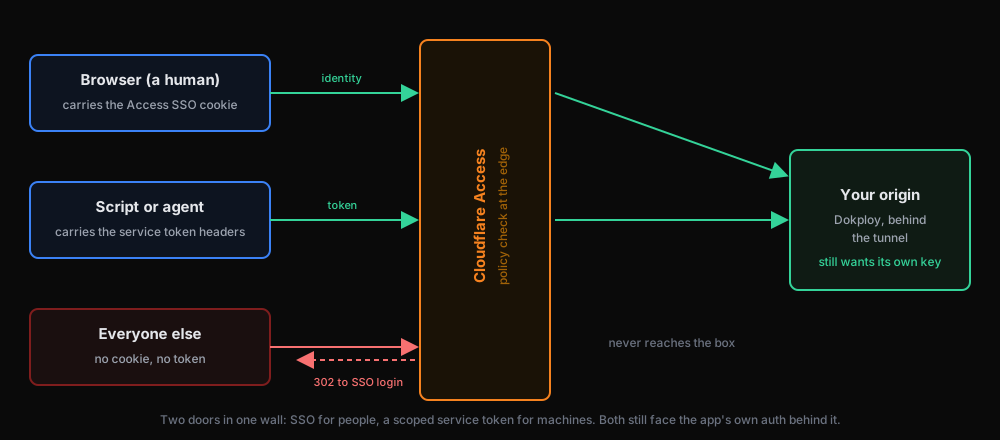 A browser request carries an Access SSO cookie and passes; an API request carries CF-Access-Client-Id and CF-Access-Client-Secret headers and passes; a request with neither is bounced at the edge with a 302, never reaching the origin
The three ways through, and why two of them are worse
| Option | What it does | What it costs |
|---|---|---|
| Remove Access | Both walls gone, everything works | Admin login page directly exposed to the internet, forever |
Bypass policy on /api/* | Browser stays gated, API paths open to anyone | Every API path unauthenticated at the edge, for the whole internet |
| Service token | One specific credential clears the edge | A long-lived secret you now have to store properly |
The bypass option deserves a second look because it is tempting and it is not insane. Your application still demands its own API key, so /api/* being open at the edge does not mean open, it means "protected by one layer instead of two." But it is open to everyone, and it collapses your defence in depth back to a single credential on exactly the surface that does the dangerous things. A service token is barely more work and keeps both layers.
If the actual irritation is the browser double-login rather than the API, there is a separate fix for that and it is not removing Access either: raise the application's session duration under Zero Trust, Access, Applications, your app, Session Duration. Set it to a month and you will log in roughly never, with the wall still standing.
What a service token actually is
A service token is a Client ID and Client Secret pair that a non-browser client sends as two HTTP headers:
CF-Access-Client-Id: <client-id>.access
CF-Access-Client-Secret: <client-secret>
Cloudflare checks them at the edge, and if a policy on that application accepts that token, the request is forwarded to your origin. Four properties are worth stating plainly, because they are exactly the ones people are unsure about:
- Your browser flow is untouched. Humans still get the SSO wall. The token path only applies to requests that actually carry those headers.
- Anyone without the pair still hits SSO. The application is exactly as shielded from the internet as it was before.
- The token clears Cloudflare only. Your app still demands its own credential on top. Two independent secrets, both required, which is the layering you wanted in the first place.
- Scope is per-application. A token only works against Access applications whose policy explicitly includes it. Attach it to one hostname and its reach is that one hostname.
That last point is the one that makes this safe enough to do casually. The token is not an account-wide skeleton key, it is a named credential that each application must opt into accepting.
Setting it up, in the order that actually works
Two steps, and they are strictly ordered. The token has to exist before a policy can reference it, and the policy has to exist before the token does anything at all.
Step 1: create the token
Go to Zero Trust, Access, Service Auth, Service Tokens, Create Service Token. Name it after the thing that will use it, not after the app it reaches. I named mine dokploy-manager-agent so that when I find it in a list in eighteen months I know which client dies if I revoke it.
You will be asked for a duration. The default is typically one year. Note the expiry date somewhere you will actually see it, because the failure mode when it lapses is a sudden wave of 302s from a client that has worked flawlessly for a year, which is a genuinely confusing thing to walk into cold.
Copy both the Client ID and the Client Secret before you leave the page. The secret is displayed exactly once. If you lose it there is no recovery flow, only deleting the token and starting over, which also means editing the policy that referenced it.
[SCREENSHOT: Service token creation screen, showing the Client ID and Client Secret revealed once]
Step 2: the policy that accepts it
This is the step people skip, and skipping it produces the identical 302 you started with, which makes it feel like the token does not work.
Go to Zero Trust, Access, Applications, open your application, and look at its policies. You should already have one that looks like "Allow users access" with action Allow. That is your browser SSO path. Leave it completely alone. You are adding a second policy next to it, not editing that one.
[SCREENSHOT: The application's Access policies list, showing the existing Allow policy]
Click Create new policy and set:
| Field | Value |
|---|---|
| Policy name | dokploy-manager-agent service auth |
| Action | Service Auth |
| Include, Selector | Service Token |
| Include, Value | your token's name |
Ordering does not matter, and Cloudflare says so on the page itself: Access evaluates Bypass and Service Auth policies before everything else, regardless of where they sit in the list.
[SCREENSHOT: The completed policy form with Action set to Service Auth and the Service Token rule]
The Allow trap
Here is the mistake I want to save you, because it is the default and it fails silently.
The Action field defaults to Allow. If you leave it there and add a service token as the only rule, the policy saves fine, appears in the list looking entirely reasonable, and your API calls keep getting bounced. The reason: Allow means "this request must satisfy an identity check," and a machine holding a service token has no identity provider login to offer. Allow plus a service-token-only rule is a contradiction, so nothing ever matches it.
Service Auth is the action that means "no identity required, the token is sufficient."
Cloudflare does warn you, in an amber box, the moment you build this combination. It is easy to read that as generic advisory noise and click past it. When you flip the Action to Service Auth, that amber warning disappears and is replaced by a blue informational note, and that swap is your visual confirmation the policy is right before you save.
[SCREENSHOT: The amber warning shown when Action is Allow with a service-token rule]
Two smaller things on that same form that look like decisions and are not:
- Policy session duration is irrelevant here. A service token authenticates every request individually and never establishes a session, so the field does nothing. Leave it on the default.
- MFA override and JIT approval should stay off. MFA will grey itself out on its own, since it is identity-only and this policy has no identity. JIT would require a human to approve each request, which for an automated client means every call hangs waiting for a person.
After saving you should see two policies on the application: your original Allow for humans, and the new Service Auth for machines. Both coexisting is exactly the intended end state.
Wiring it into the client
Store the pair the same way you store every other secret for that machine: outside the repository, permissions locked down.
umask 077
cat >> ~/.config/dokploy-manager/personal.env <<'EOF'
CF_ACCESS_CLIENT_ID=<client-id>.access
CF_ACCESS_CLIENT_SECRET=<client-secret>
EOF
Then every call carries three headers, two for the edge and one for the application:
curl -sS https://dokploy.example.com/api/project.all \
  -H "CF-Access-Client-Id: $CF_ACCESS_CLIENT_ID" \
  -H "CF-Access-Client-Secret: $CF_ACCESS_CLIENT_SECRET" \
  -H "x-api-key: $DOKPLOY_TOKEN"
If you get JSON back, both layers are satisfied. If you still get an HTML login page, the two headers are not clearing the edge, which in practice means the policy action is still Allow or the token in the policy is not the token in your env file. If you get a 401 or 403 with a JSON body, congratulations, that is progress: you are now through Cloudflare and talking to the application, and the remaining problem is its own key.
That distinction is the most useful debugging signal in the whole setup. HTML means the edge rejected you. JSON means the app rejected you. Two layers, two failure shapes.
The things that will bite you later
- Expiry. The token has a finite lifetime and will stop working on a date you have already forgotten. Put the expiry in a calendar, not in your head.
- It is a real secret. This credential clears your edge protection. It is only as safe as where you put it. Never in a commit, never in chat, never in a log line. A file at
600outside the project tree is the floor. - One token per client. Resist reusing one token across several machines or several applications. The value of a scoped credential is that revoking it has a blast radius you can predict.
- Revocation is instant and total. This is the property the SSO-only setup does not give you. If the pair leaks, delete it in Zero Trust and it is dead everywhere, immediately, with no coordination and no key rotation on the origin.
That last point is worth sitting with. Before this, if I suspected a compromise the only real lever was "change the Dokploy password and hope." Now the outer layer has a kill switch I can pull in five seconds from a phone.
Where this leaves the stack
Walking back through the series, the box now looks like this:
- No inbound ports open at all, from part 1.
- All traffic arrives through an outbound tunnel, from part 2, so the origin IP is not even public.
- Human access to the dashboard requires SSO at the edge, from part 3, before anything touches the box.
- Machine access requires a scoped, revocable, expiring token at the edge, plus the application's own key, from this post.
Nothing was weakened to make automation work. I added a second door with its own lock rather than propping the first one open, which is the whole idea. The instinct when a security layer blocks your tooling is almost always to remove the layer, and almost always the platform has already built the narrow thing you actually wanted.