
In part 1 I locked a fresh VPS down until an external port scan came back completely empty. Nothing answers on the public internet. SSH is reachable only over Tailscale, the firewall denies all inbound, and I proved it from the outside.
That is a great place to be and a useless place to stay, because a server that serves nothing to anyone is just an expensive space heater. The whole point is to eventually run a website. So here is the puzzle this post solves: how do you serve HTTPS to the entire internet without opening port 80 or 443, without exposing your server's IP, and without undoing a single thing from part 1? The answer is a Cloudflare Tunnel, and the trick is that it gets in by going out.
Why not just open 80 and 443
The obvious move is "it's a web server, open the web ports." It works, and it quietly signs you up for four problems:
- You punch an inbound hole in the firewall. Every open port is attack surface that bots find within minutes. You spent part 1 closing things; this reopens two of them to the entire world.
- Your origin IP is now public. Anyone who resolves your domain knows exactly which box to attack, and they can hit it directly, skipping any protection you put in front.
- You own TLS. Certificates to obtain, renew, and not let expire at 2am. Let's Encrypt makes it easier, not free of operational risk.
- DDoS lands on you. A flood hits your box's NIC directly, and a small VPS does not win that fight.
A Cloudflare Tunnel flips the entire model. Instead of the internet reaching in to your server, a small daemon on your server reaches out to Cloudflare and holds that connection open. Requests come back down the link your server already opened.
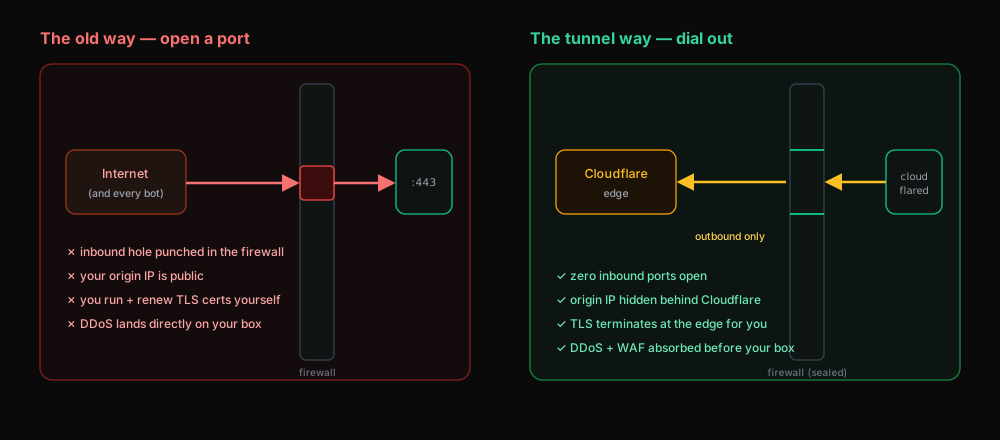 The old way punches an inbound hole in the firewall and exposes your origin; the tunnel dials out, so no inbound port is opened and TLS, DDoS, and your IP are all handled at Cloudflare's edge
Because the connection is outbound, your firewall never has to allow an inbound port to make it work. A deny-all-inbound box can still serve the whole internet. That is the part that feels like cheating the first time you see it.
How it actually works
cloudflared is the daemon. On startup it dials Cloudflare's edge and keeps a persistent connection open. When a visitor requests app.example.com, the request hits Cloudflare's edge, Cloudflare terminates TLS there, and then forwards the request down the existing tunnel to your cloudflared, which hands it to your local app on localhost:80. The response goes back the same way.
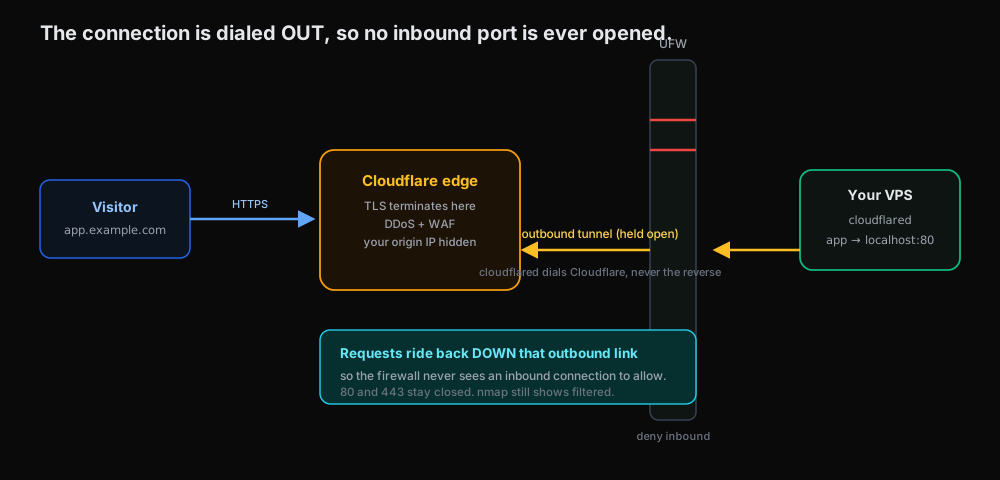 A visitor hits Cloudflare's edge over HTTPS; cloudflared on the VPS has dialed out and holds the tunnel open, so the request rides back down that link to the local app while the firewall stays sealed
Your origin only ever speaks plain HTTP to itself on loopback. The firewall sees one outbound connection from your box (allowed by the default "allow outgoing" policy) and zero inbound connections to gate. So 80 and 443 stay closed, and the external nmap from part 1 still shows them filtered.
Setting it up
You need a domain on Cloudflare (its DNS managed by Cloudflare). Everything below runs on the server, over your Tailscale SSH.
1. Install cloudflared from Cloudflare's apt repo so it auto-updates:
curl -fsSL https://pkg.cloudflare.com/cloudflare-main.gpg \
  | sudo tee /usr/share/keyrings/cloudflare-main.gpg >/dev/null
echo "deb [signed-by=/usr/share/keyrings/cloudflare-main.gpg] https://pkg.cloudflare.com/cloudflared any main" \
  | sudo tee /etc/apt/sources.list.d/cloudflared.list
sudo apt-get update && sudo apt-get install -y cloudflared
2. Authenticate to your Cloudflare account. This opens a browser link; pick the zone (domain) you want to authorize. It drops a cert.pem in ~/.cloudflared/:
cloudflared tunnel login
3. Create a named tunnel. This mints a tunnel and its credentials file. The name is yours; I called mine vps:
cloudflared tunnel create vps
# → Created tunnel vps with id a1b2c3d4-...  (creds saved to ~/.cloudflared/<id>.json)
4. Write the ingress config at /etc/cloudflared/config.yml. This maps a hostname to a local service. The catch-all 404 at the end is required:
tunnel: vps
credentials-file: /root/.cloudflared/<tunnel-id>.json

ingress:
  - hostname: app.example.com
    service: http://localhost:80
  - service: http_status:404
5. Route DNS. This creates the app.example.com CNAME pointing at the tunnel, automatically:
cloudflared tunnel route dns vps app.example.com
6. Run it as a service so it survives reboots:
sudo cloudflared service install
sudo systemctl enable --now cloudflared
systemctl status cloudflared --no-pager
Proving it
Two checks. First, the app is reachable from the public internet over real HTTPS:
curl -sI https://app.example.com | head -1
# HTTP/2 200
Second, and this is the satisfying one, the box is still sealed. Run the same external scan from part 1, from a machine off your tailnet:
nmap -Pn -p 22,80,443 203.0.113.42
# 22/tcp  filtered
# 80/tcp  filtered
# 443/tcp filtered
A live website on app.example.com, and every port on the origin still answers nothing. The traffic never touched an inbound port; it came down the tunnel.
What you got for free
By terminating at Cloudflare's edge instead of your box, you inherited a stack you would otherwise build and babysit:
- TLS with no certs on the origin. Cloudflare presents the certificate; your app speaks plain HTTP on loopback. Nothing to renew.
- Your origin IP is hidden. Visitors resolve a Cloudflare address. There is no public IP to point an attack at, and even if someone learns it, the firewall drops them.
- DDoS and WAF are absorbed at the edge before anything reaches your VPS.
- More sites are just more ingress lines. Add another
hostname:block pointing at another local port, route its DNS, and restart cloudflared. One tunnel can front many apps.
Where this goes next
So the model is set: dial out, serve in, keep every port closed. Right now my tunnel points at a throwaway python3 -m http.server on port 80, which proves the pipe but is not exactly a deployment platform.
In part 3 I put a real PaaS on the box, Dokploy, so I get push-button deploys, databases, and automatic routing behind that same tunnel. It is great. It also installs Docker, and Docker has its own opinions about your firewall. The first thing I did after installing it was re-run the external nmap from this post, and three ports that I never opened came back open. That is the part 1 cliffhanger coming true, and part 3 is where we catch it and put the firewall back in charge.