This is the practical payoff of my auth series. The crypto posts explained signing and JWKS, and the protocol post explained OAuth, OIDC, and PKCE. Here is where all of it shows up somewhere you use every day: the moment you type gh auth login, aws sso login, gcloud auth login, or just claude and a browser tab pops open. You already know the concepts; this post is how a command-line tool, of all things, drives them.
Why a terminal is a hard place to log in
A web app has it easy: it already lives inside the browser, so it can bounce you through an OAuth redirect for free. A CLI has two problems a web app never faces.
First, it has no window of its own, and it frequently runs somewhere with no browser at all: an SSH session, a container, a CI runner, a headless server. So "open the login page" is not obviously possible.
Second, it cannot keep a secret. A web app's backend can hold a client_secret no user ever sees. But a CLI is a binary downloaded by thousands of people; any secret baked into it is extractable with strings. RFC 8252 (OAuth for native apps) says this outright: a secret shipped inside a distributed app "should not be treated as confidential", so these tools are public clients and must not rely on a client secret.
So every tool below is solving the same two problems: (1) how do I drive a browser login from a terminal, and (2) how do I prove I am the legitimate client at the token exchange with no real secret? The answer to (2) is always the same, so let me do it first.
Problem 2: no secret? Use PKCE
A confidential web app proves "this is really my app" at the token exchange by sending its client_secret. A CLI has none. PKCE (Proof Key for Code Exchange, RFC 7636) replaces that secret with a fresh, per-login secret the app makes up on the spot:
- Before starting, the CLI generates a random
code_verifier(a high-entropy string, 43 to 128 chars). - It sends only the hash of it,
code_challenge = base64url(SHA-256(code_verifier)), on the authorize request (withcode_challenge_method=S256). - When it later exchanges the authorization
codefor tokens, it includes the originalcode_verifier. - The server re-hashes the verifier and checks it matches the challenge it stored. No match, no tokens.
start:    verifier = random(); challenge = base64url(sha256(verifier))
authorize:  ... &code_challenge=<challenge>&code_challenge_method=S256
token:      ... &code=<code>&code_verifier=<verifier>
server:   sha256(verifier) == stored challenge ?  yes -> issue tokens
Why this matters: on a CLI the redirect lands somewhere a different local program might observe (a loopback port, a custom URL scheme). If an attacker grabs the code, it is useless without the code_verifier, which never left the CLI's memory. PKCE is what makes a secretless public client safe, and current best practice (the OAuth Security BCP, RFC 9700) recommends it for essentially every client, not just CLIs. With problem 2 handled, the only question left is getting the browser's answer back to the terminal. There are two patterns.
Problem 1, pattern A: the loopback redirect
This is what runs when you are at a real desktop with a browser. The trick is almost cheeky: the CLI briefly becomes a web server.
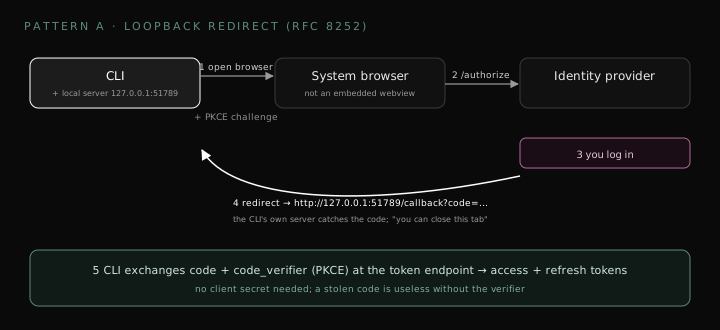 Loopback redirect: the CLI starts a local server, opens the browser, and catches the redirect on 127.0.0.1
- The CLI binds a throwaway HTTP server to the loopback interface on a random free port, e.g.
127.0.0.1:51789. - It opens your system browser (not an embedded webview, which could read your password) to the IdP's authorize URL, with
redirect_uri=http://127.0.0.1:51789/callbackand the PKCE challenge. - You log in in the browser. The IdP redirects to
http://127.0.0.1:51789/callback?code=.... - That request hits the CLI's own little server, which reads the
codestraight off the URL, shows you a "you can close this tab" page, and shuts the server down. - The CLI exchanges the
code+code_verifierfor tokens.
Two details worth knowing. The IdP has to allow any port for a loopback redirect (the CLI cannot know in advance which free port the OS will hand it), so it matches only the host and path. And tools use the literal 127.0.0.1, not localhost: localhost can resolve to other interfaces and risks listening somewhere broader than the loopback. Used by gcloud, AWS CLI (current versions), Git Credential Manager, and Claude Code.
Problem 1, pattern B: the device authorization grant
The loopback trick falls apart the second there is no browser on the machine: SSH into a server, a Docker container, a CI job. You cannot open a tab, and even if you could, its redirect to 127.0.0.1 would hit the wrong machine. The device authorization grant (RFC 8628) solves this by decoupling the two: authenticate on any device, while the CLI waits.
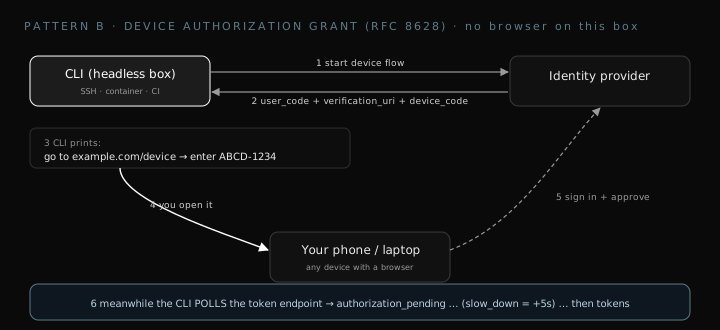 Device grant: the CLI shows a code, you approve on any device, and the CLI polls until authorized
- The CLI asks the IdP to start a device flow and gets back a
user_code(a short code a human can type), averification_uri(a short, memorable URL), a hiddendevice_code, and a pollinterval. - It prints: "Go to https://example.com/device and enter ABCD-1234." You open that on your phone or laptop, sign in, and approve.
- Meanwhile the CLI polls the token endpoint with the
device_code. Until you finish it getsauthorization_pendingand keeps waiting; if it polls too fast it getsslow_down(and must add 5 seconds to its interval, every time, not just once). When you approve, the next poll returns the tokens.
No local server, no redirect, nothing that depends on the CLI's machine having a browser. This is the flow you get from gh by default, and from AWS with --use-device-code. The trade-off is the manual code-typing step, which is exactly why tools prefer loopback when a browser is actually reachable.
Worked example: AWS CLI SSO (a two-stage token)
AWS IAM Identity Center is the richest example because it has two tokens, and only the second one can actually sign API calls.
When you run aws sso login (or first set it up with aws configure sso):
- RegisterClient dynamically registers the CLI as a public OIDC client.
- Authorize. Since AWS CLI v2.22.0 (late 2024) the default is authorization code + PKCE over a loopback redirect; before that, and still with
--use-device-code, it is the device grant. - CreateToken returns an SSO access token, cached in
~/.aws/sso/cache/(good for about 8 hours, with a refresh token alongside it).
That SSO token still cannot sign a request to S3. It is a portal bearer token. So there is a second stage: when you actually run aws s3 ls, the CLI calls GetRoleCredentials with that SSO token and gets back short-lived temporary STS credentials (an access key, secret, and session token, valid about an hour), cached separately in ~/.aws/cli/cache/. Those are what sign the real API call. When they expire the CLI silently fetches more, no browser needed, until the SSO token itself expires.
I wrote up this exact flow, including a real InvalidRequestException bug I hit, in a dedicated post: How aws configure sso actually works. It is the same loopback + PKCE pattern from above, traced end to end in one tool.
Worked example: gh, and the two layers of git auth
gh auth login defaults to the device grant (you have seen its "enter this code at github.com/login/device" screen). It gets an OAuth token and stores it in your OS keychain (or, as a fallback, in ~/.config/gh/hosts.yml). Fine. But the more interesting thing is what happens next: gh auth setup-git registers gh as a git credential helper, and that reveals a split most people never notice.
Git authentication has two separate layers:
- Layer 1, credential storage. Helpers like
osxkeychain,cache, andstoreare pure key-value secret caches. Git hands them a host and they hand back a stored username and password. They do not know what OAuth is. No secret cached means they return nothing. - Layer 2, token production.
gh(and Git Credential Manager) are OAuth clients wearing a credential-helper costume. When git asks them for a credential and none is cached, they step outside git entirely, run the full browser or device OAuth handshake, get a token, stash it in a Layer-1 store, and only then hand git back ausername+password.
The punchline: git itself has no idea OAuth exists. It knows nothing about redirects, scopes, refresh tokens, or device codes. It asks a helper for a username and a password and sends them over HTTPS. Whether that "password" is a token minted seconds ago by an OAuth dance or a personal access token you pasted in by hand, git cannot tell the difference. That is why both a gh OAuth token and a manually-created PAT work identically for git push: to git they are the same opaque string.
Worked example: Claude Code (what is documented, and what is not)
Claude Code (Anthropic's CLI) authenticates with your Claude account through a browser-based OAuth authorization-code flow with a loopback/localhost callback, exactly pattern A. The documented behaviour:
- Running
claudeopens a browser on first launch;/loginand/logoutmanage the session. - If the browser cannot reach the CLI's local callback server, it shows a login code to paste back into the terminal instead. The docs call out that this is "common in WSL2, SSH sessions, and containers", which is the device-grant problem being handled with a manual paste rather than a full device flow.
- Credentials are stored in the macOS Keychain, or on Linux/Windows in
~/.claude/.credentials.json(mode0600). - For CI,
claude setup-tokenruns the OAuth flow once and prints a long-lived (about a year) token you set as an environment variable, with a documented order of precedence between that, anANTHROPIC_API_KEY, and cloud-provider credentials.
Where I will be honest about the limits: the finer mechanics are not in the official docs. That it uses PKCE, the exact authorize/token endpoints, the client id, the keychain entry name, token lifetimes: those are reverse-engineered and circulate in the community, and they can change between versions, so I will not state them as fact. What is safe to say is the shape, and the shape is the same one every other tool here uses.
The common thread
Step back and all five tools are doing the same three things, built on machinery from the rest of this series:
- Log in once, via a token cache. Every tool caches the result of the OAuth dance, in the OS keychain or a
0600file (~/.aws/sso/cache,~/.config/gh,~/.config/gcloud,~/.claude), so you are not re-authenticating on every command. - Short-lived access tokens, long-lived refresh. Access tokens expire fast (AWS's portal token in hours, its STS creds in about an hour). A refresh token, or a fresh
GetRoleCredentialscall, silently mints new ones until the long-lived session finally lapses and you log in again. - The servers still verify exactly like a web app. These tokens are not magic CLI tokens. A bearer token is validated by the resource server against a signature and a JWKS, and AWS's temporary credentials sign each request with SigV4. The CLI is just an unusually awkward OAuth client; the verification side is unchanged.
So your instinct, if you have read the rest of the series, is right: there is nothing new under the hood. A terminal login is the same OAuth, PKCE, signing, and JWKS you already understand, with one clever adaptation for "there is no browser here" (loopback or the device grant) and one for "I cannot keep a secret" (PKCE). Everything else you have already seen.
Start from the crypto overview if you want the foundations, or the protocol map for OAuth and OIDC themselves.