
For years my AWS CLI setup was the same ritual: create an IAM user, attach a policy, generate an access key, and paste AKIA... plus a secret into ~/.aws/credentials. It worked. It also meant a permanent password to my cloud sat in a plaintext file on every machine I touched.
This week I finally switched a dev box over to aws configure sso. The setup looked simple, then it failed three times in a row on an error that had nothing to do with what it said. This post is the version of events I wish I had read before I started: first why this is worth doing at all, then what each prompt does, what happens when the browser opens, and the one-line gotcha that cost me the most time.
Why this is worth doing
I start with the why on purpose, because the how only makes sense once the motivation is obvious. I almost skipped this whole migration. Access keys worked, and switching looked like busywork. Here is what changed my mind, and why I think anyone still pasting AKIA... keys should care.
- A static key is a standing liability. It is a password to your cloud that never expires. Every copy on every laptop, CI runner, and stale git branch stays live until a human manually kills it. You are one screenshot or one careless
git add .away from a breach with no clock on the damage. - Short-lived credentials put a timer on every leak. With SSO the worst case is a token that dies in hours. The blast radius of a mistake shrinks from "forever" to "this afternoon".
- It is less work day to day, not more. No key rotation, no "which account was this key for again", no secret rotting in a dotfile. You log in once through the browser and forget about it.
- It is where AWS is going. AWS now actively steers humans away from long-lived IAM user keys toward Identity Center. Learn it once and it pays off across every account and every tool that reads
~/.aws.
That is the why. Everything below is the how.
The old way: a permanent key in a file
An IAM user with an access key is a credential that never expires. You make it once and it works until you remember to delete it. That is the problem. If it leaks (a git commit, a stolen laptop, a screenshot), it keeps working until a human notices and revokes it. There is no clock running against the attacker.
The permissions are also stuck to you. The policy hangs off the user, so revoking access means hunting down and deleting keys.
What SSO actually changes
aws configure sso wires the CLI to IAM Identity Center (the service AWS used to call "AWS SSO"). Instead of a forever-key on disk, you log in through a browser once, and the CLI fetches temporary credentials that expire in a few hours and refresh themselves.
The mental model that made it click for me:
Old way: a master key you carry forever. SSO: a building badge that re-issues itself each morning and dies overnight.
| IAM user + access key | SSO (Identity Center) | |
|---|---|---|
| Credential | Static AKIA..., never expires | Temporary, expires in hours, auto-refreshed |
| On disk | Secret in plaintext ~/.aws/credentials | Short-lived cached token only |
| If leaked | Valid until you delete it | Dead within hours |
| Revoke | Delete the key or user | Admin un-assigns, instant and org-wide |
| Permissions | Attached to you | Central permission sets |
The catch: SSO only works if an admin has enabled IAM Identity Center at the organization level. On a personal account you would enable it yourself first.
Walking through aws configure sso
Running the command kicks off a wizard. Here is what each prompt is actually asking for.
SSO session name (Recommended): my-dev-poc
SSO start URL [None]: https://d-xxxxxxxxxx.awsapps.com/start
SSO region [None]: ap-south-1
SSO registration scopes [sso:account:access]:
- SSO session name is just a label for a login session block. One session can feed many profiles.
- SSO start URL is your organization's access portal. This is the one I got wrong conceptually at first (more below).
- SSO region is where Identity Center itself is hosted. Not where your workloads run. Where the login service lives.
- Registration scopes authorize the CLI to list accounts and pull role credentials. The default is fine, just hit enter.
After that the browser opens, you authenticate, and the CLI asks you to pick an account and a role. Finally it writes this to ~/.aws/config:
[sso-session my-dev-poc]
sso_start_url = https://d-xxxxxxxxxx.awsapps.com/start
sso_region = ap-south-1
sso_registration_scopes = sso:account:access

[profile AdministratorAccess-<account-id>]
sso_session = my-dev-poc
sso_account_id = <account-id>
sso_role_name = AdministratorAccess
region = us-east-1
You run the wizard once. After that it is just aws sso login.
The start URL is a front door, not an account
This tripped me up before I even hit an error. I have two accounts: a contained dev account that is just mine, and the main org account. I was nervous that pointing the CLI at the org's portal would somehow hand me the main account.
It does not. The start URL only proves who you are. Which account you get is chosen after login, not by the URL. The portal lists every account and role you are allowed, you pick one, and the resulting profile is pinned to exactly that sso_account_id and sso_role_name. A command run against that profile physically cannot touch any other account, because the temporary credentials it fetches are minted for that one account and role.
In my case the portal only exposed the dev account anyway:
The only AWS account available to you is: <account-id>
So the worry was moot, but the principle is the useful part: one portal, you select the account.
One more wrinkle worth naming. My org logs in through Microsoft Entra (the myapplications.microsoft.com launcher), not a native AWS login. That launcher is not the start URL. It is the identity provider in front of AWS. The real start URL is the ...awsapps.com/start page you land on after clicking the AWS tile. When the CLI opens that URL, AWS sees Entra is the identity provider and bounces you to the Microsoft login transparently. You feed the CLI the AWS portal URL; the Microsoft auth just happens in the middle.
What actually happens when the browser opens
The browser popup is not magic. On a current CLI (v2.22 and later) it is the OAuth 2.0 Authorization Code grant with PKCE, run against Identity Center's OIDC service. The giveaway is in the URL the CLI prints: response_type=code, code_challenge_method=S256, and a redirect_uri pointing at http://127.0.0.1:PORT/oauth/callback. (Before v2.22 the default was the older Device Authorization Grant. You can still force that with --use-device-code, which is what you want on a headless box that cannot open a browser.)
Here is the actual trace, from hitting enter to a finished login:
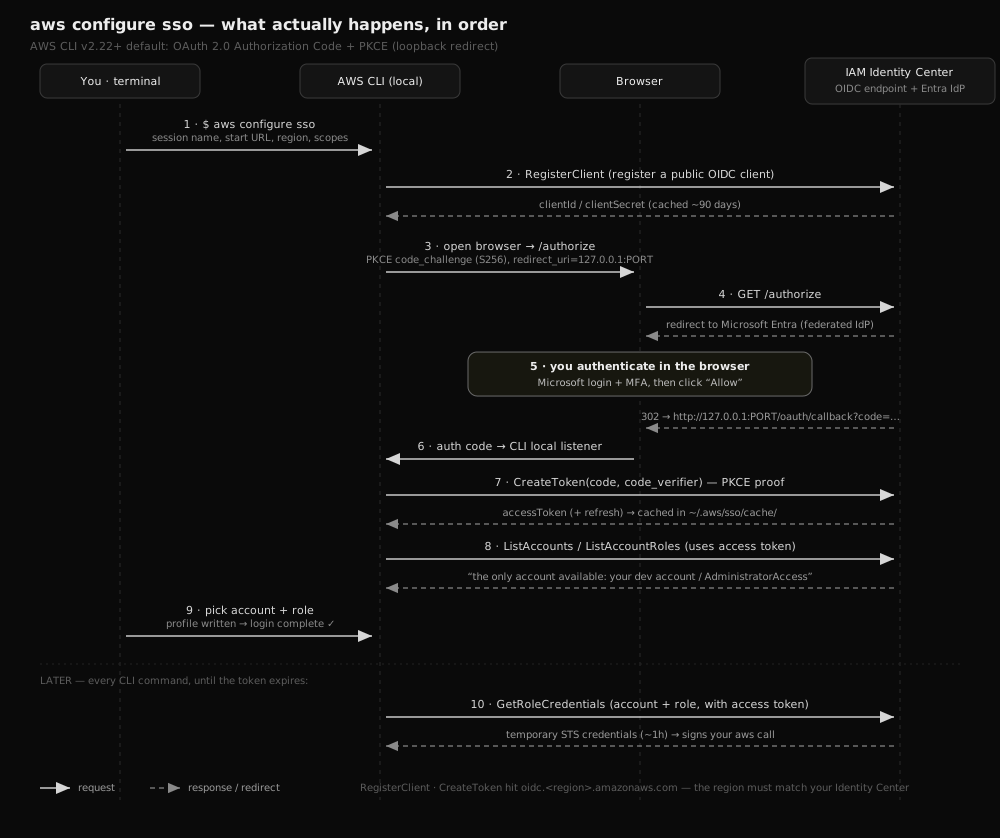 Sequence trace of aws configure sso: RegisterClient, then a PKCE authorize request, browser login through Microsoft Entra, a loopback redirect carrying the authorization code, CreateToken to mint the access token, ListAccounts and ListAccountRoles, and finally GetRoleCredentials returning temporary STS credentials
Step through the network calls
Press Next / Back (or use ← → arrow keys) to watch each call go through
sends: you enter the session name, start URL, region, and scopes
Walking it in words:
- RegisterClient. The CLI registers itself as a public OIDC client and caches a client id (valid ~90 days) so it does not re-register every time.
- Authorize (PKCE). The CLI generates a
code_verifierand its hashedcode_challenge, starts a tiny local listener on127.0.0.1:PORT, and opens the browser to/authorize. - You log in. The browser hits Identity Center, which in my case federates to Microsoft Entra. You authenticate with MFA and click Allow. Your credentials never pass through the CLI; only the browser sees them.
- Loopback redirect. Identity Center redirects the browser to
http://127.0.0.1:PORT/oauth/callback?code=..., and the CLI's local listener catches the one-time authorization code. Restricting the redirect to localhost is the security trick: the code can only land back on your own machine. - CreateToken. The CLI exchanges that code plus the original
code_verifierfor an SSO access token (and a refresh token), cached under~/.aws/sso/cache/. The verifier proves the client finishing the flow is the same one that started it. - ListAccounts / ListAccountRoles. Using the access token, the CLI asks which accounts and roles you may use. This is the "the only account available to you is..." line.
- GetRoleCredentials. When you run a real command, the CLI trades the access token for temporary STS credentials for your chosen account and role, valid about an hour. When they expire it silently re-fetches, no browser needed, until the access token itself expires.
There are three credential layers, and conflating them is where confusion lives:
- SSO access token (8 hours by default) proves you logged in.
aws sso loginrefreshes it. - Temporary role credentials (~1 hour by default) are the actual keys used to call AWS, fetched per account and role, never written to
~/.aws/credentials. - OIDC client registration (~90 days) identifies the CLI app itself.
The bug: InvalidRequestException on RegisterClient
Here is where I lost time. The wizard failed instantly, before the browser even opened:
An error occurred (InvalidRequestException) when calling the RegisterClient operation:
Note there is no message after the colon. The error is empty, which is its own kind of cruel. I chased two dead ends before finding the real cause.
Dead end 1: the trailing slash
My first guess was the start URL. I had pasted it with a trailing slash (.../start/), and a trailing slash is a commonly suggested culprit online (the theory being that the CLI derives an issuer URL from it that a stray slash can malform). It is worth a try if you hit this — drop the slash to .../start and re-run. For me it changed nothing, same error, so I cannot confirm it was ever the cause. Treat it as a quick thing to rule out, not a fix.
Dead end 2: the CLI version
The scope-based registration needs AWS CLI v2.9.0 or later, and old boxes ship ancient versions. So I checked:
aws-cli/2.23.6 Python/3.13.5 Linux/...
Current. Not the problem either.
The real cause: wrong SSO region
RegisterClient runs against the regional OIDC endpoint, oidc.<region>.amazonaws.com. I had typed us-east-1 because that was the region showing in my console. But my Identity Center instance does not live in us-east-1. The OIDC endpoint in that region cannot find my instance, so it rejects the registration. Empty InvalidRequestException.
The fix was one value. I found the real region (ap-south-1) from the portal's "Access keys" popup, which prints the exact sso_region and sso_start_url to copy. Re-ran the wizard, the browser opened, and it sailed through.
The tell I had already seen and missed
The most annoying part: the answer was on my screen an hour earlier. When I had opened IAM Identity Center in the us-east-1 console, the page showed an "Enable IAM Identity Center" button with a marketing splash.
That is the tell. If an instance existed in that region, the page would show a dashboard, not an "Enable" prompt. The "Enable" splash was the console quietly telling me "nothing here, your instance is elsewhere." I read it as "you have not set this up yet" and went looking for a button to press, when it actually meant "wrong region."
So if RegisterClient fails with an empty InvalidRequestException and your CLI is current, suspect the region before anything else. The console region you happen to be viewing is not necessarily your Identity Center home region.
Making it the default
The wizard named my profile AdministratorAccess-<account-id>, which is a mouthful to type on every command. Since this box is only ever this one account, I made it the default by editing ~/.aws/config and renaming the section header:
[default]
sso_session = my-dev-poc
sso_account_id = <account-id>
sso_role_name = AdministratorAccess
region = us-east-1
One gotcha here too: the default profile is [default], not [profile default]. Named profiles in the config file take the profile prefix; the default one does not. Get it wrong and the CLI silently ignores the section.
After that, no flags needed:
aws sso login
aws sts get-caller-identity
aws s3 ls
Takeaways
- SSO replaces a permanent key on disk with short-lived credentials fetched through a browser login. Strictly better for anything human.
- The start URL is a front door, not an account. You pick the account after authenticating, and the profile is pinned to it.
- Your Microsoft or Okta launcher is not the start URL. The start URL is the
awsapps.com/startpage behind the AWS tile. - An empty
InvalidRequestExceptiononRegisterClientwith a current CLI almost always means wrong SSO region. The console region you are viewing is not necessarily where Identity Center lives. - An "Enable IAM Identity Center" splash in a given region means there is no instance there, not that you have no instance at all.
- Make it
[default], not[profile default].
The whole thing took longer than it should have, almost entirely because of one wrong region and a console hint I misread. But the end state is worth it: no static keys anywhere, and a login that expires on its own.
Sources
- Configuring IAM Identity Center authentication with the AWS CLI
- AWS IAM Identity Center concepts for the AWS CLI
- IAM Identity Center credential provider (SDKs and tools)
- How IAM Identity Center authentication is resolved
- RegisterClient (OIDC API reference)
- AWS CLI Adds PKCE-based Authorization for SSO
- Anatomy of AWS SSO's Device Authorization Grant
- Shared config and credentials files format