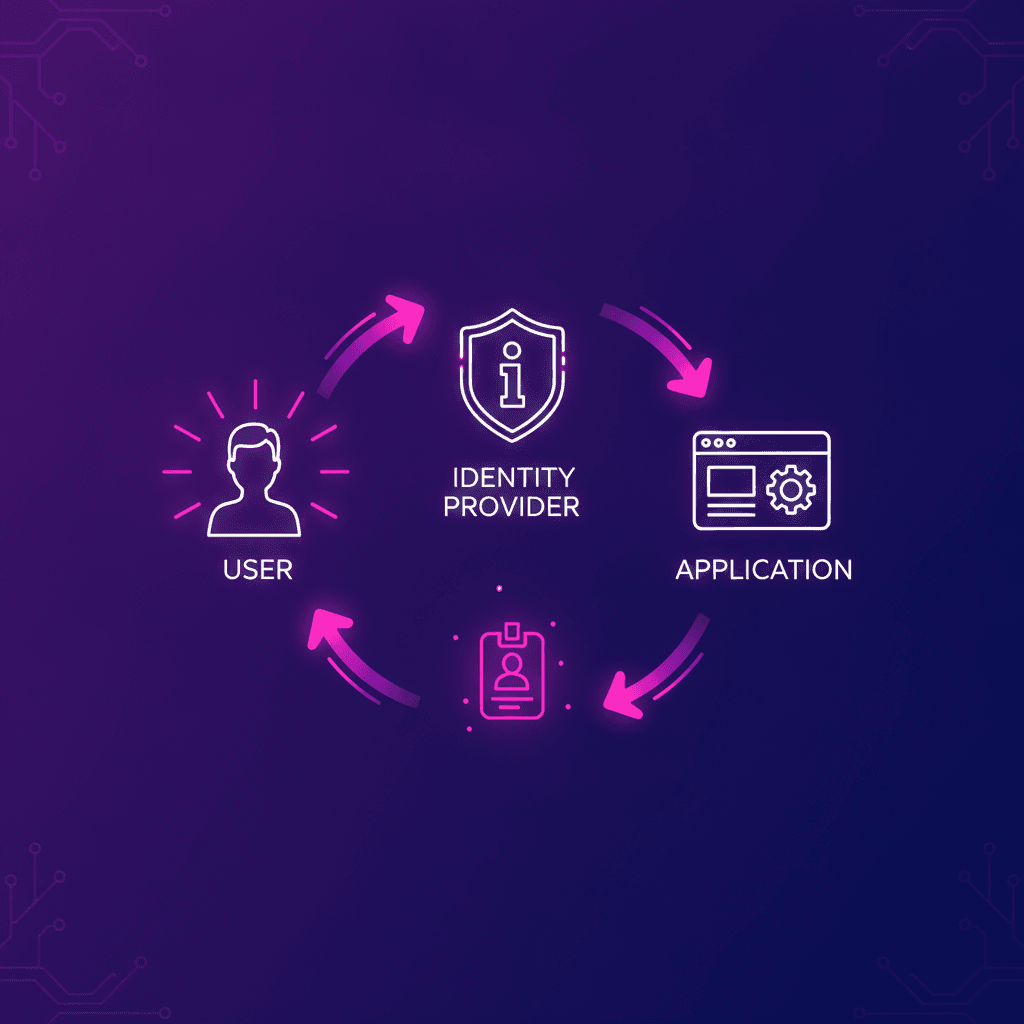
This is a companion to my series on what public-private keys actually do. That series is about the crypto primitives. This post is one level up: the protocols that produce and exchange the signed tokens those primitives secure. If the signing post explained the JWT, this one explains where the JWT comes from.
Why these five blur together
OAuth2, OIDC, SAML, LDAP, SCIM. They all surface the moment you touch "login", so people treat them as interchangeable buzzwords. They are not. They solve different problems, and the single most common mistake (one that caused real security bugs across the industry for years) is assuming OAuth2 logs users in. It does not, on its own. Get the distinctions straight and the whole "auth stack" stops being alphabet soup.
The one distinction that unlocks everything
Two words that sound identical and mean opposite things:
- Authentication (authN): who are you? Proving identity. Logging in.
- Authorization (authZ): what are you allowed to do? Granting access.
Almost every confusion here is a authN/authZ mix-up. The headline fact:
OAuth2 is an authorization protocol. OIDC is a thin authentication layer bolted on top of it. They are not competitors; OIDC is OAuth2 plus identity.
Hold that and the rest falls into place.
The five, at a glance
| Standard | For | Format | Where you meet it |
|---|---|---|---|
| OAuth 2.0 | authorization: "let app X access resource Y on my behalf" | access tokens | "Allow this app to read your Google Drive" |
| OIDC (OpenID Connect) | authentication: who is the user, an identity layer on top of OAuth2 | ID token (JWT) + JWKS + discovery | modern "Log in with..." / SSO |
| SAML | authentication / SSO | signed XML assertions | older, enterprise SSO (Okta, AD FS, corporate logins) |
| LDAP | directory: query users / groups | a query protocol, not tokens | legacy apps authenticating against a directory |
| SCIM | provisioning: sync / auto-create users | JSON / REST | auto-add or disable employees across your apps |
Notice they split into three jobs, not one: logging in (OIDC, SAML), delegating access (OAuth2), and user lifecycle (LDAP for lookup, SCIM for provisioning).
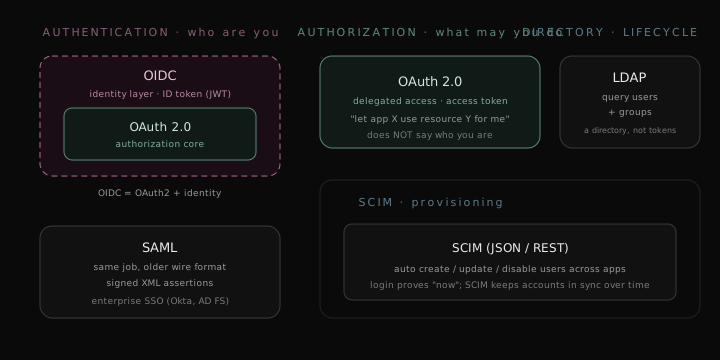 Where each protocol sits: authorization, authentication, directory, and provisioning
OAuth 2.0: delegated authorization
OAuth2 answers: how do I let one app act on my behalf at another, without giving it my password? The classic screen is "Allow Figma to access your Google Drive". You are not logging into Figma as Google here; you are granting Figma limited access to a Google resource.
The output is an access token: a credential the app sends to an API to prove "I am allowed to do this specific thing". It may be opaque (a random string the API looks up) or a JWT.
What OAuth2 deliberately does not do is tell the app who you are. There is no standard "identity" in raw OAuth2. For years people abused the access token as a stand-in for identity ("I can call the userinfo API, so the user must be logged in"), and it was fragile and exploitable. That gap is exactly what OIDC was created to fill.
OIDC: authentication on top of OAuth2
OpenID Connect takes the OAuth2 machinery and adds a real identity layer:
- An ID token: a signed JWT that says who the user is (
sub,email,iss,aud,exp). This is the exact token dissected in the signing post. - A
userinfoendpoint for additional profile claims. - JWKS (the public keyring) and discovery (
/.well-known/openid-configuration) so any client can find the issuer's endpoints and verify tokens automatically.
This is what every modern "Log in with Google / Microsoft / GitHub" button speaks, and what an identity provider like Authentik, Clerk, or WorkOS hands your backend. The trust in that ID token is pure signing: your backend verifies the JWT's signature against the issuer's JWKS, checks iss/aud/exp, and now knows who logged in.
Three tokens people constantly confuse
OAuth2/OIDC hand you up to three tokens, with different jobs:
| Token | Question it answers | Typical form | Lifetime |
|---|---|---|---|
| ID token (OIDC) | who is the user? | JWT | short |
| access token (OAuth2) | what may the bearer do? | opaque or JWT | short (minutes to ~1h) |
| refresh token | give me a new access token | opaque, stored securely | long |
The ID token is for your app to learn the user's identity. The access token is for calling APIs. The refresh token silently buys new access tokens so the user is not bounced to a login screen every hour.
The OIDC login flow you actually use
Almost every OIDC login is the authorization-code flow. Five steps, and the last one is where the crypto from the signing post pays off:
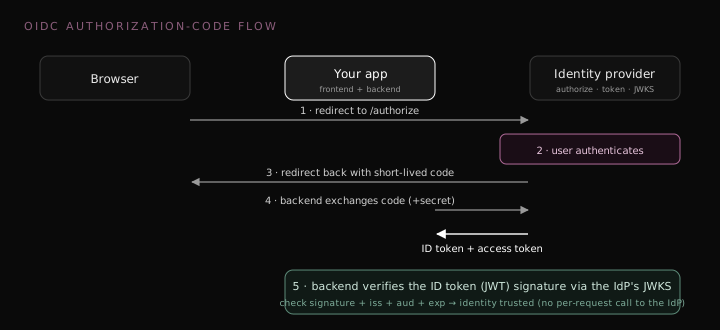 The OIDC authorization-code flow, ending in a JWKS-verified ID token
- Your app redirects the browser to the identity provider's authorize endpoint.
- The user authenticates there (password, Google, a passkey, whatever the IdP offers).
- The IdP redirects back to your app with a short-lived code.
- Your backend exchanges that code (plus its client secret) for the ID token + access token at the token endpoint.
- Your backend verifies the ID token's signature against the IdP's JWKS, checks
iss/aud/exp, and trusts the identity.
Step 5 is the entire bridge to the crypto series: the IdP signed the ID token with its private key; you verify with its public key. No call back to the IdP per request, no shared secret, just a signature check.
The parts the flow skips: code exchange, cookies, state, deep links
The five steps are the happy path. The interesting, bug-prone details live in the gaps, and they are exactly the things an auth SDK quietly handles for you (and that you have to get right if you ever hand-roll it).
The code-for-tokens exchange is a back-channel call
Step 4 deserves slowing down on. When the browser lands on your callback with ?code=...&state=..., your backend (not the browser) makes a server-to-server POST to the IdP's token endpoint, sending code + client_id + client_secret + redirect_uri, and gets back the ID token and access token.
Two things make that safe:
- The
codeis single-use and useless on its own. Intercepting it does not help an attacker, because redeeming it also requires the client secret. - The client secret never touches the browser. It lives only on your server, and it is what proves "this really is my app" during the exchange.
That client-secret story is the confidential client case: an app with a backend that can actually keep a secret. Public clients (single-page apps, mobile apps, CLIs) cannot hide a secret, so they use PKCE (Proof Key for Code Exchange) instead. At the start the client invents a random code_verifier, sends only its SHA-256 hash (code_challenge) on the authorize request, and then proves possession by sending the original code_verifier at the token exchange. A stolen code is useless without the verifier. Current best practice (the OAuth 2.0 Security BCP, RFC 9700, 2025) recommends PKCE for all clients, secret or not, and it is exactly what CLI tools lean on, which is a post of its own.
And those tokens are signed by the IdP's private key, not yours. Your app has no signing key; the only key it ever touches is the IdP's public key from the JWKS, used to verify (the whole point of the signing post).
state: the anti-CSRF nonce that pulls double duty
Before redirecting to the IdP, your app generates a random state (e.g. secrets.token_urlsafe(16), a cryptographically random URL-safe string), stashes it in a short-lived cookie, and includes it on the authorize request. The IdP echoes state back on the callback, and you check it matches.
Its job is CSRF protection, not routing. An attacker cannot forge a valid callback because they cannot guess your state; without it, someone could trick your app into completing a login the user never started (login CSRF). In the minimal case it is purely a random nonce you compare for equality. But state has a second, optional job we will use below: it can also carry the URL the user originally wanted.
Where the session lives: cookie flags that matter
Once you have verified the ID token, you create a session and hand it to the browser as a cookie. The flags on that cookie decide how safe it is:
| Flag | What it does | Why it matters |
|---|---|---|
HttpOnly | JavaScript cannot read it (document.cookie is blind to it) | stops an XSS bug from stealing the session |
Secure | only sent over HTTPS | stops it leaking over plain HTTP (omit on http://localhost, always set in prod) |
SameSite | controls sending on cross-site requests | CSRF defense, covered next |
Max-Age / Expires | lifetime | short (minutes) for the state cookie, longer for the session |
Domain / Path | which hosts and paths receive it | scope; default is the exact host |
Two that get conflated: HttpOnly is about XSS (script cannot read the cookie), Secure is about the network (cookie only crosses HTTPS). They defend against different attacks; in production you usually want both. And on lifetimes, max_age=300 is 300 seconds, five minutes, not five hours; the state cookie only needs to survive one login round-trip.
SameSite: Lax vs Strict vs None
This is the cookie flag people get wrong most, and it is what makes OAuth both work and stay safe. SameSite controls whether the browser attaches the cookie when a request originates from a different site:
| Value | Sent on cross-site requests? | Trade-off |
|---|---|---|
Strict | never, not even when you click a link to the site from elsewhere | safest against CSRF, but breaks "click the email link and you are already logged in" |
Lax | only on top-level navigations (a GET from clicking a link or following a redirect), not cross-site POST, fetch, or iframes | the sweet spot, and what OAuth needs |
None | always, including cross-site iframes and AJAX | required for genuine third-party / embedded contexts, and the browser rejects it unless Secure is also set |
Two clarifications that fix the usual misconceptions:
SameSiteis about cross-site (a different registrable domain,evil.comvsmyapp.com), not sub-domains.app.myapp.comandmyapp.comare the same site here. (One subtlety: modern browsers also fold the scheme into "site", sohttp://andhttps://of the same host count as different sites.)Laxis why OAuth works, with a caveat. The standard callback usesresponse_mode=query: the IdP 302-redirects the browser back to you, a top-level GET navigation, so aLaxcookie (yourstate) rides along; a cross-sitePOSTor hidden iframe would not carry it, which is what defeats CSRF. The caveat: if you useresponse_mode=form_post(or SAML's HTTP-POST binding), the callback is a cross-site POST, and aLaxcookie is not sent. Those flows needSameSite=None; Secure. (Chrome once had a "Lax + POST" two-minute grace window, but it only ever applied to cookies left implicitly Lax and is being removed, so do not rely on it.)Strictcan also be too aggressive and drop the cookie on the inbound redirect;Laxis the right default for a standard OAuth flow.
Deep links: sending the user back where they wanted to go
Here is a gap most minimal demos skip. Say a logged-out user hits myapp.com/dashboard/conversation-123. Your guard bounces them to /login, they authenticate, and a naive callback finishes with redirect("/"), dumping them on the home page instead of the conversation they were after.
The fix is state's second job. At /login, capture the path the user originally wanted and carry it through, either encoded inside state or in a separate short-lived cookie. On /callback, after verifying, redirect to that saved path instead of /:
/login    : save original path "/dashboard/conversation-123" into state (or a cookie)
IdP       : authenticates, echoes state back
/callback : verify state + token, then redirect(saved_path) instead of "/"
This is exactly what production SDKs do; for example authkit-nextjs seals a returnPathname into its state. So state ends up doing double duty: a CSRF nonce (always) plus a return-path carrier (optional).
One security catch worth its own line: validate that return path before redirecting to it. Only allow same-origin relative paths. If you blindly redirect to whatever was stashed, an attacker can set it to https://evil.com and turn your login into an open redirect.
SAML: the XML elder
SAML does the same job as OIDC (authentication / SSO) but predates it and speaks signed XML assertions instead of JWTs. It is heavier and more verbose, and it is everywhere in enterprise: Okta, AD FS, corporate "log in with your company account" flows.
Conceptually it is the same primitive underneath, a signed statement of identity that a relying party verifies. The wire format is just XML with XML-DSig signatures rather than a compact base64 JWT. If you are building consumer or modern B2B login, you reach for OIDC; if you are selling to enterprises whose IT standardised on SAML years ago, you support SAML too.
LDAP: the directory, not a login protocol
LDAP is the odd one out: it is not about tokens at all. It is a protocol for querying a directory of users and groups. The canonical example is Microsoft Active Directory. Legacy and on-prem apps often "authenticate" by binding against an LDAP directory (checking a username/password directly against it) and reading group membership for authorization.
Think of LDAP as the database-of-people that older auth systems sit on top of, where OIDC/SAML are the modern, token-based handshakes that usually front a directory like it.
SCIM: provisioning, not login
SCIM is also not a login protocol. It answers a different lifecycle question: how do users get created, updated, and deactivated across all my apps automatically? It is a JSON/REST standard for provisioning.
The scenario: an employee joins, and your HR/identity system uses SCIM to auto-create their account in Slack, GitHub, and your internal tools; they leave, and SCIM deactivates all of them in one sweep. Login (OIDC/SAML) proves who someone is right now; SCIM keeps the set of accounts in sync over time. They complement each other.
Which one do you reach for?
| You want to... | Use |
|---|---|
| Add "Log in with Google/Microsoft" to a modern app | OIDC |
| Let enterprise customers bring their own IdP | SAML (and OIDC) |
| Let an app act on a user's behalf at an API | OAuth 2.0 |
| Authenticate against an existing on-prem directory | LDAP |
| Auto-provision and de-provision users across apps | SCIM |
The takeaway
OAuth2 is authorization (delegated access). OIDC is authentication layered on OAuth2, and it is what mints the signed ID token your app trusts. SAML is the older XML way to do authentication/SSO. LDAP is a directory you query. SCIM is provisioning. Different jobs, often used together in one stack.
And every one of the identity protocols (OIDC's ID token, SAML's assertion) ultimately rests on a signature. That is the crux: to really understand them, understand digital signatures. Start from the overview if you want the crypto foundation first.