The server I rent has always had exactly one job: host my apps. Dokploy runs on it and deploys everything I ship as Docker containers, quietly, in the background. Recently I wanted a second thing from the same machine. I wanted to write code on it. And the moment I thought about it, the obvious fear showed up: what stops a dumb mistake in my dev work from dragging my live apps down with it?
Here is how I gave that one server a second job without letting the two jobs fight.
Why bother doing this at all
The tempting shortcut is to just SSH into the host and start coding right there. It works for about a week, until the day a build goes wide, a test leaks memory, or some script forks itself into the ground. On a shared box that is not a dev annoyance, it is an outage. The Linux OOM killer does not know which processes are "mine to break" and which are serving real traffic. Under memory pressure it just picks a victim. Your dev mistake and your production database are neighbors with no fence between them.
The other option is to rent a second server purely for coding. Clean, but now I am paying for and patching two machines when the first one sits half-idle most of the day.
What I actually wanted was the middle path: code on the box I already have, but behind a wall that guarantees my experiments can never starve the apps that matter. Get that right and the whole calculus flips. I can be reckless in the sandbox precisely because the recklessness stays in the sandbox.
The one idea that makes it safe
Here is the thing I had backwards at first. I assumed the goal was heavy isolation: a whole separate virtual machine, its own kernel, a real wall. But two workloads share a kernel perfectly well. What actually takes production down is not "they touched each other," it is one side spiking CPU or RAM with no upper bound.
So the real job is not isolation, it is a ceiling. Give the dev side a hard limit it physically cannot cross, and the apps above it are safe even though they live on the same machine.
Docker already enforces exactly this through cgroups. Three limits do the work:
| Limit | What it does | Why it protects prod |
|---|---|---|
--memory | hard cap on RAM | a leak trips the OOM killer inside the sandbox only, so prod never notices |
--cpus | cap on vCPU | a runaway build cannot grab more than its slice |
--cpu-shares | priority under contention | when both want the CPU at once, prod wins |
Isolation (a separate filesystem, separate processes) is still nice. It means I can install junk and trash the place freely. But that is a convenience. The ceiling is the safety mechanism.
The mental model: a little machine I SSH into
When I first pictured "do all my dev inside a container," it sounded claustrophobic, like I would be typing every command through docker exec forever. It is not that at all.
The trick is to run an SSH server inside the container. Once it has its own sshd and a port, it becomes independently addressable. I do not SSH into the host and then climb into the container. I SSH straight into the container as if it were its own little server. From my editor's point of view it is indistinguishable from a remote machine: same shell, same git, same npm install. VS Code and Cursor connect over Remote-SSH and it just works.
This, it turns out, was the exact thing I liked about OrbStack on my Mac: spin up a clean Linux machine and drop straight into it over SSH. I wanted that same feeling on the server, and a container-with-sshd delivers it.
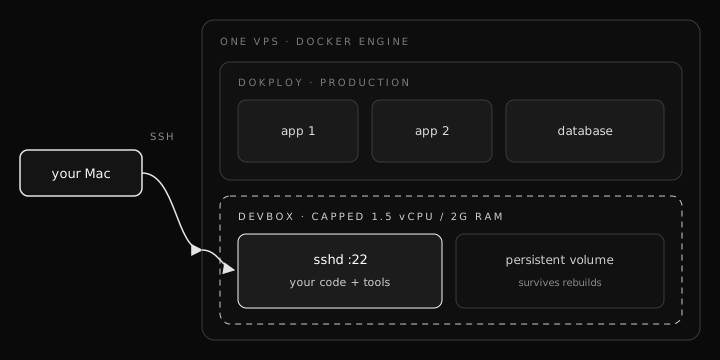 One VPS running Dokploy production apps and a resource-capped devbox side by side, with the devbox behind a dashed cgroup fence
The files
Three small files and two commands.
The Dockerfile is just a normal Ubuntu with an SSH server, my toolchain, and a user whose only credential is my public key:
FROM ubuntu:24.04
RUN apt-get update && apt-get install -y \
    openssh-server sudo git curl build-essential ca-certificates \
    && rm -rf /var/lib/apt/lists/*
RUN useradd -m -s /bin/bash dev \
    && echo "dev ALL=(ALL) NOPASSWD:ALL" > /etc/sudoers.d/dev \
    && mkdir -p /home/dev/.ssh
COPY authorized_keys /home/dev/.ssh/authorized_keys
RUN chown -R dev:dev /home/dev/.ssh \
    && chmod 700 /home/dev/.ssh && chmod 600 /home/dev/.ssh/authorized_keys \
    && sed -i 's/#\?PasswordAuthentication yes/PasswordAuthentication no/' /etc/ssh/sshd_config
EXPOSE 22
CMD ["/usr/sbin/sshd", "-D", "-e"]
Drop my Mac's public key next to it as authorized_keys, and that single file is what lets me (and only me) log in. No passwords.
The compose file is where the safety actually lives. Everything above is convenience. These four lines are the fence:
services:
  devbox:
    build: .
    container_name: devbox
    restart: unless-stopped
    ports:
      - "2222:22"          # host:container
    cpus: "1.5"            # hard CPU cap
    mem_limit: "2g"        # hard RAM cap, OOM stays inside the devbox
    memswap_limit: "2g"    # no extra swap thrash
    volumes:
      - devbox-home:/home/dev   # work survives rebuilds
volumes:
  devbox-home:
Then bring it up and step in:
docker compose up -d --build
ssh -p 2222 dev@your-server-ip
That is it. I am in a shell inside a sandbox that cannot cross 1.5 vCPU or 2 GB of RAM, no matter what I do to it.
Getting in without opening a port
I already reach this server through a Cloudflare Tunnel, so there is no public SSH port to begin with, and I did not want to open one. The nice part is the tunnel can carry SSH too. I point an ingress rule at the container's port and let cloudflared forward the stream inward:
# tunnel config
ingress:
  - hostname: dev.yourdomain.com
    service: ssh://localhost:2222
  - service: http_status:404
On my Mac, one SSH config block routes the connection over the tunnel:
# ~/.ssh/config
Host devbox
  HostName dev.yourdomain.com
  User dev
  ProxyCommand cloudflared access ssh --hostname %h
Now ssh devbox drops me straight into the sandbox, over the tunnel, with nothing listening publicly on the VPS at all. It is arguably more locked down than raw SSH, and it reuses infrastructure I already run.
What I ruled out, and why
Two ideas I considered and dropped.
Running OrbStack on the server. This was my first instinct, because OrbStack is what gave me the feeling I was chasing in the first place. But OrbStack is a macOS app. It is wonderful for local dev on my Mac, and it has no place on a Linux VPS. There is simply no build for it there.
Running a VM inside the VPS. My server is itself a VM from a cloud provider, so a VM inside it means nested virtualization. Most providers disable that outright, and even where it is allowed it pre-reserves RAM and doubles the overhead, which is the opposite of what I want on a box I am trying to keep lean for production.
If I did want that "clean little machine I can trash" feeling with stronger isolation than a container gives, the Linux-native answer is Incus (the modern LXD). Its system containers feel like tiny VMs but stay container-light, and they take the same hard CPU and memory caps. For now the plain Docker container wins for one boring reason: Dokploy already put Docker on the box, so it is zero new infrastructure.
Managed by Dokploy, or standalone?
One real decision remains. Do I let Dokploy manage the devbox as one of its apps, or run it as a plain compose stack sitting alongside Dokploy?
I lean standalone. Dokploy's whole job is to reconcile production toward a desired state, and I do not want my dev sandbox at the mercy of that loop. A redeploy or a reconcile should never be able to yank the box out from under an active coding session. Keeping the thing I experiment in decoupled from the thing that auto-heals my apps feels like the right seam. The tradeoff is that the devbox will not show up in the Dokploy UI and I manage its lifecycle by hand, which for a single long-lived container is barely any work.
Where this leaves me
One VPS, two jobs, one fence between them. My apps keep running under Dokploy exactly as before, and I get a real coding box I SSH straight into, capped so my worst mistake stays my problem and not my users'. The whole thing cost me three files and no extra hosting bill.
If you try this, the only numbers worth tuning up front are the caps. Look at how much headroom your box actually has when production is at its normal load, then hand the sandbox a slice that still leaves prod comfortable. Start conservative. You can always give the sandbox more room later. You cannot un-crash an app.