
How experienced teams ship Postgres schema changes to running prod systems without downtime — and why some migrations are easy while others can take down your service.
Why this is scary
A schema change in prod is unlike a code change. Code rolls back instantly; a deploy is a few minutes. A schema change can:
- Acquire a lock that blocks every read AND write to a table for the duration. On a busy table, that's an outage.
- Rewrite the entire table on disk (ALTER TYPE, certain ADD COLUMN patterns) — minutes to hours of full-table I/O.
- Be irreversible without a restore (
DROP COLUMN,DROP TABLE). - Get serialized behind another long transaction, so you can't even abort it cleanly.
- Replicate to read replicas with lag — 30 minutes of replica lag means 30 minutes of stale reads for whatever uses the replica.
- Race with rolling deploys: the DB has the new schema, but half your pods are still running old code that breaks on it.
Migrations are scary because the worst-case blast radius is "everyone who uses this DB is down right now".
The good news: every dangerous category has a known-safe alternative. The job is to recognise the category and pick the right pattern.
Taxonomy: easy / medium / hard
The single most useful skill is being able to look at a migration and classify it. Roughly:
🟢 Easy (just ship it)
| Operation | Why safe |
|---|---|
| Add new table | No existing data, no locks held |
| Add column with constant default (Postgres 11+) | Metadata-only — no table rewrite, no lock beyond microseconds |
| Add column nullable, no default | Metadata-only |
CREATE INDEX CONCURRENTLY | Doesn't lock writes |
| Drop unused index | Almost instant; no lock issues |
These are "type and run" — pre-deploy checklist still applies, but you don't need expand/contract.
🟡 Medium (think before running)
| Operation | What to watch out for |
|---|---|
| Add column with NOT NULL + default | Pre-PG11 → table rewrite. PG11+ ok if default is a constant; volatile default (e.g. gen_random_uuid()) still rewrites. |
| Add foreign key | Default takes ACCESS EXCLUSIVE on both tables. Use ADD CONSTRAINT ... NOT VALID then VALIDATE CONSTRAINT separately. |
| Add unique constraint | Lock during validation. Build a unique index CONCURRENTLY first, then ADD CONSTRAINT ... USING INDEX. |
| Drop column | Quick, but deploy code that stops referencing it first, or old code 500s. |
| Backfill data | Row count × per-row cost. Batch it (100-10,000 rows at a time, with sleeps). Don't UPDATE ... WHERE x IS NULL against millions of rows in one statement. |
🔴 Hard (expand/contract is the only sane path)
| Operation | Why hard |
|---|---|
| Rename column / table | Old code reads old name; new code reads new name. Single rename = guaranteed window of brokenness. |
| Change column type | Almost always rewrites the table. Locks for the duration. |
Add NOT NULL to existing column with NULLs | Need to backfill first; then validate; the SET NOT NULL itself takes a lock to scan. |
| Split one column into two (or merge two into one) | Pure schema-shape change → many app code paths affected. |
| Restructure a 1:1 relationship into 1:many | Same — multi-step, can't be atomic. |
The ones in this row are where teams either (a) take downtime, (b) do
expand/contract over multiple deploys, or (c) reach for tooling like
pgroll to automate the dance.
The expand/contract pattern (the key idea)
The single most useful pattern. Also called "parallel change."
The shape: never change the schema and the app at the same time. Instead, evolve them in additive only steps until both old and new code work, then remove the old.
Renaming email → email_address as a worked example:
| Phase | DB | App | Both old + new code work? |
|---|---|---|---|
| 0. Start | email | reads/writes email | ✓ |
| 1. Expand (deploy A) | Add email_address, nullable | unchanged | ✓ |
| 2. Dual-write (deploy B) | both columns exist | writes to both, reads from email | ✓ |
| 3. Backfill (no deploy) | populate email_address from email in batches | unchanged | ✓ |
| 4. Switch reads (deploy C) | both columns exist | reads from email_address, still writes both | ✓ |
| 5. Stop dual-write (deploy D) | both columns exist | writes only to email_address | ✓ |
| 6. Contract (deploy E) | drop email | unchanged | ✓ |
That's a single rename across five deploys. Yes, really. Each step keeps both versions of the code happy → rolling deploys, canaries, and rollbacks all work cleanly.
The same shape covers type changes, constraint tightening, splitting, and 1-to-many restructures. The pattern is the contract: at no point is schema and app version of the column going to disagree.
Postgres-specific traps you have to know
1. The lock queue
ALTER TABLE waits for an ACCESS EXCLUSIVE lock. If a slow query is
holding even a SELECT against that table, the DDL waits — and every
other query that touches the table now queues behind the DDL. A single
slow query → instant outage during a "fast" migration.
Mitigation: always set a short lock_timeout on the migration
session, and retry on failure:
SET lock_timeout = '2s';
ALTER TABLE users ADD COLUMN ...;
If we can't grab the lock in 2 seconds, fail fast and retry later. Don't let our DDL be the head of an ever-growing queue.
2. Default values that rewrite the table
The PG11+ optimization: ALTER TABLE ... ADD COLUMN ... DEFAULT <expr>
is metadata-only (milliseconds) when the default is non-volatile —
Postgres evaluates the expression once and stores it in the catalog
(pg_attribute.attmissingval). Every old row gets the same value at read
time. New rows evaluate normally on insert.
The optimization applies based on Postgres function volatility class, not on whether the value is "constant" in the everyday sense:
| Default | Volatility | Optimization? | Notes |
|---|---|---|---|
true, 0, 'active', 42 | constant (immutable) | ✓ fast | Stored once. |
now(), CURRENT_TIMESTAMP | STABLE | ✓ fast | Stored once → every old row gets the same timestamp (the moment you ran ALTER TABLE). Often surprising — usually you want different per-row timestamps, in which case backfill in batches instead. |
gen_random_uuid(), random() | VOLATILE | ✗ rewrite | Each row needs a distinct value → full table rewrite, ACCESS EXCLUSIVE held the whole time. |
clock_timestamp() | VOLATILE | ✗ rewrite | Different per call. |
Mental model: "Can Postgres compute the value once and reuse it?" Yes → metadata-only. No → table rewrite.
Safe pattern for volatile defaults (or when you need real per-row
values even from a stable function like now()):
-- step 1: cheap, metadata only
ALTER TABLE t ADD COLUMN c TYPE;

-- step 2: cheap, metadata only — sets the default for FUTURE inserts
ALTER TABLE t ALTER COLUMN c SET DEFAULT <expr>;

-- step 3: backfill existing rows in batches (separate transactions)
UPDATE t SET c = <expr>
  WHERE c IS NULL
  ORDER BY ctid
  LIMIT 10000;
-- repeat until 0 rows updated; sleep between batches to give VACUUM room

-- step 4: optionally enforce NOT NULL after backfill
ALTER TABLE t ALTER COLUMN c SET NOT NULL;  -- still scans the table briefly
Why each step is safe:
- (1) new column nullable → metadata only, no row touch
- (2) future-only default → metadata only
- (3) small batches → row-level locks for milliseconds, no
ACCESS EXCLUSIVE. Total wall-clock can be hours on big tables, but the app keeps serving the whole time. - (4)
SET NOT NULLdoes scan the whole table to verify no nulls; takes a briefACCESS EXCLUSIVE. On big tables you can avoid even this scan with theCHECK (c IS NOT NULL) NOT VALID+VALIDATE CONSTRAINTSET NOT NULLtrick (PG12+) — Postgres uses the validated check constraint as proof and skips re-scanning.
3. CREATE INDEX blocks writes
Plain CREATE INDEX takes a SHARE lock — blocks writes until done. On
big tables, that's minutes of write blocking.
Always: CREATE INDEX CONCURRENTLY .... It takes only SHARE UPDATE EXCLUSIVE instead of SHARE — INSERT/UPDATE/DELETE keep working. (It
does still block other DDL and VACUUM FULL on the same table.)
Wall-clock is slower (it does two table scans and waits for in-flight
writers), but no app downtime.
Hard Postgres rule: CREATE INDEX CONCURRENTLY cannot run inside a
transaction. Alembic wraps each migration in a transaction by default, so
you have to opt out for the index step. The cleanest way is alembic's
autocommit_block():
def upgrade():
    with op.get_context().autocommit_block():
        op.create_index(
            "ix_users_email",
            "users",
            ["email"],
            postgresql_concurrently=True,
        )
The block commits the outer transaction before the CREATE INDEX CONCURRENTLY, runs it standalone, and resumes the migration after.
Works on Postgres only; the kwarg is ignored on other dialects.
4. Validating new constraints
ADD CONSTRAINT ... NOT VALID skips the validation pass — fast. Then
VALIDATE CONSTRAINT separately, which only takes a SHARE UPDATE EXCLUSIVE lock (allows reads + writes, blocks DDL).
This trick works for CHECK, FOREIGN KEY. Use it religiously.
5. MVCC, dead tuples, and autovacuum
This isn't a "trap" exactly — it's the model that explains why the "batch + breathing room" mantra exists everywhere in this doc.
MVCC. When you UPDATE or DELETE a row in Postgres, the old
version is not removed from disk. It's marked obsolete; new versions
are written elsewhere. This is what lets concurrent transactions see
consistent snapshots without blocking each other — Postgres's super-power.
The cost: dead row versions ("dead tuples") accumulate. A million UPDATEs leaves a million dead rows on disk, slowing scans.
VACUUM reclaims the space dead tuples occupy and marks it reusable
for future inserts. (VACUUM FULL actually compacts the file, but locks
the whole table — almost never used in prod.)
autovacuum is the background daemon that runs VACUUM (and
ANALYZE, which refreshes planner stats) on its own. By default it
fires when a table is roughly 20% dead tuples. If autovacuum is keeping
up, you don't think about it. Ever.
Two failure modes that hit during migrations:
- Backfill UPDATE generates dead tuples faster than autovacuum can
reclaim them. The table file on disk balloons way past the row
count — bloat. Scans slow down, queries get worse. After the
backfill you may need an explicit
VACUUM tablename;to recover. - A long-running transaction freezes autovacuum globally. Vacuum
can't reclaim tuples that any open transaction might still see. So
one big multi-hour
UPDATEblocks vacuum across the entire DB, bloating every table — not just the one you're touching. This is the worst of the two, because the symptoms appear far from the cause.
This is why "batch + breathing room" matters: short transactions let autovacuum do its job between batches. A common shape:
-- run this in a loop until 0 rows updated:
UPDATE t SET c = <expr>
  WHERE c IS NULL
  ORDER BY ctid
  LIMIT 10000;
-- sleep 1s between batches; autovacuum gets a window to reclaim
After a heavy backfill, follow up with VACUUM tablename; (or even
VACUUM ANALYZE tablename;) to be sure. Cheap insurance.
Operational practices
Where migrations run in the deploy pipeline
The two patterns most teams use:
A. Migration as a one-off task before deploy. Run alembic upgrade head as a separate ECS one-off task or CI step, before the new app
version starts rolling out. App containers don't run migrations on
startup.
- Pros: explicit, atomic, fails fast. No race when N tasks all start at once.
- Cons: more pipeline plumbing.
B. Migration on app startup. Each container runs alembic upgrade head in its entrypoint (what app4/fastapi-app/entrypoint.sh does
today).
- Pros: trivial, works for single-task setups.
- Cons: N tasks racing. Alembic's locking helps but doesn't make it pretty. Don't use this past 1 task.
For anything resembling prod: use pattern A. Pattern B is fine while learning.
Two real pipelines that follow Pattern A — the migration step is its own stage, before the deploy stage that rolls the new app version:
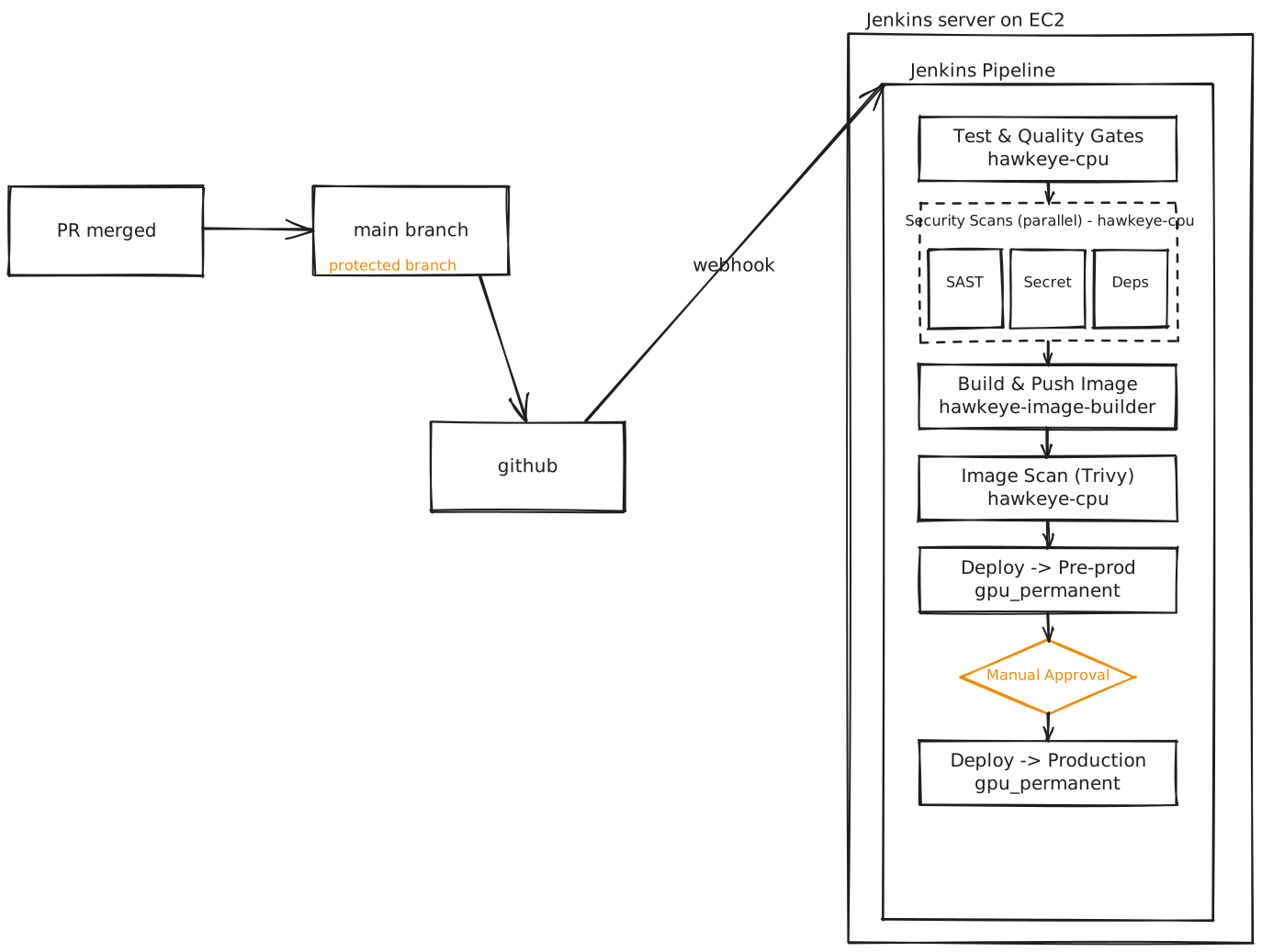 CI/CD pipeline — orchestrator service
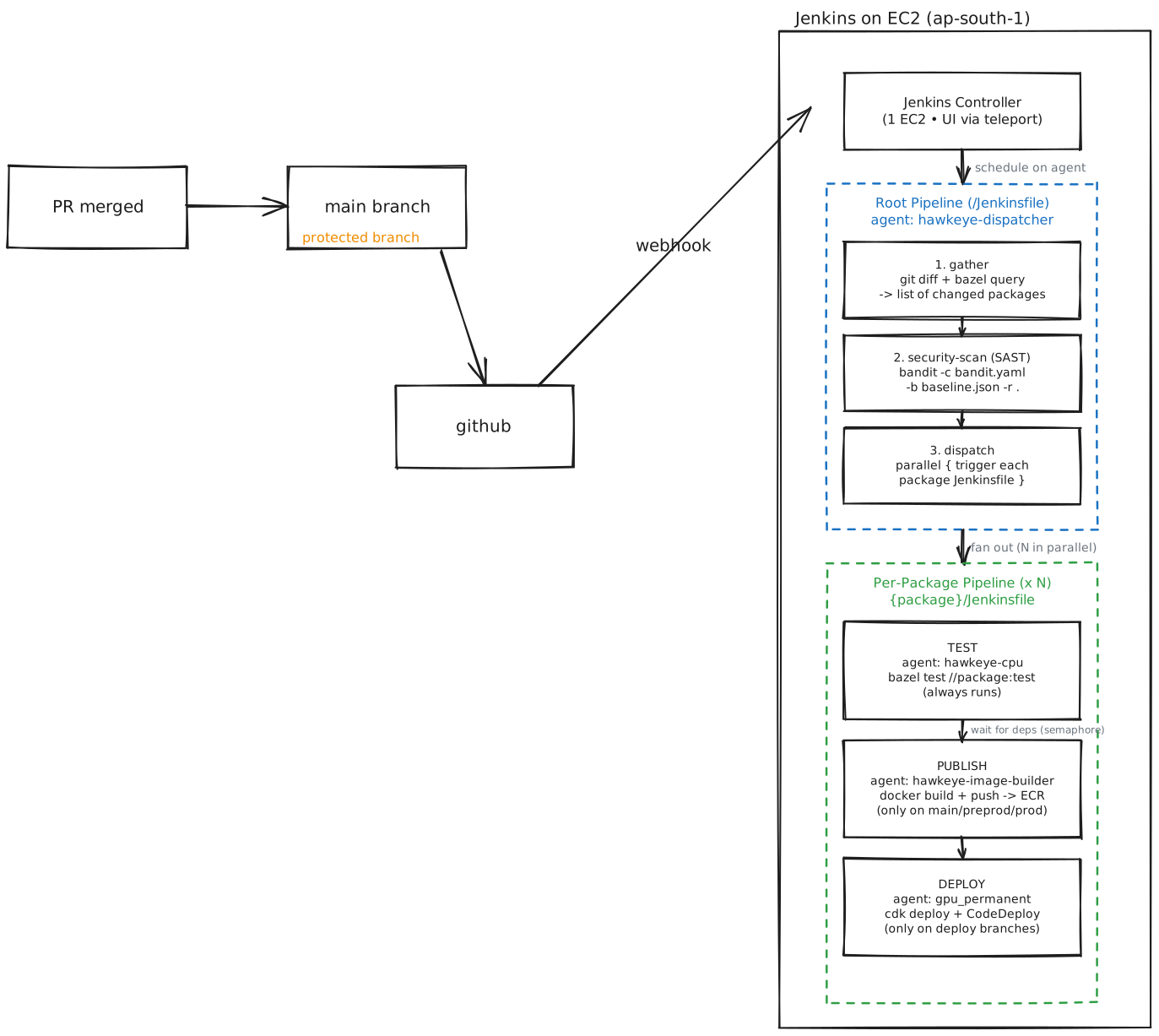 CI/CD pipeline — main app, with per-package fan-out
Backward compatibility is the real product
Code and DB at every deploy boundary must be mutually compatible. Always ask: "if half my fleet is on the new version and half on the old, do they both work against this schema?"
If the answer is no, you need expand/contract.
Rollback plans
- Forward-only rollback (preferred). Don't run
alembic downgrade. Instead, write a new migration that reverses what you did. Easier to reason about, plays nicely with linear migration history, and you only ever go forward in version. - Schema rollback after data has been written is hard. New rows in the new column don't fit the old schema. Rolling back schema and code together = data loss.
- Snapshot before scary changes. RDS can restore a point-in-time snapshot if a migration goes catastrophically wrong. For non-trivial migrations on prod data, take a manual snapshot beforehand.
Test in stages
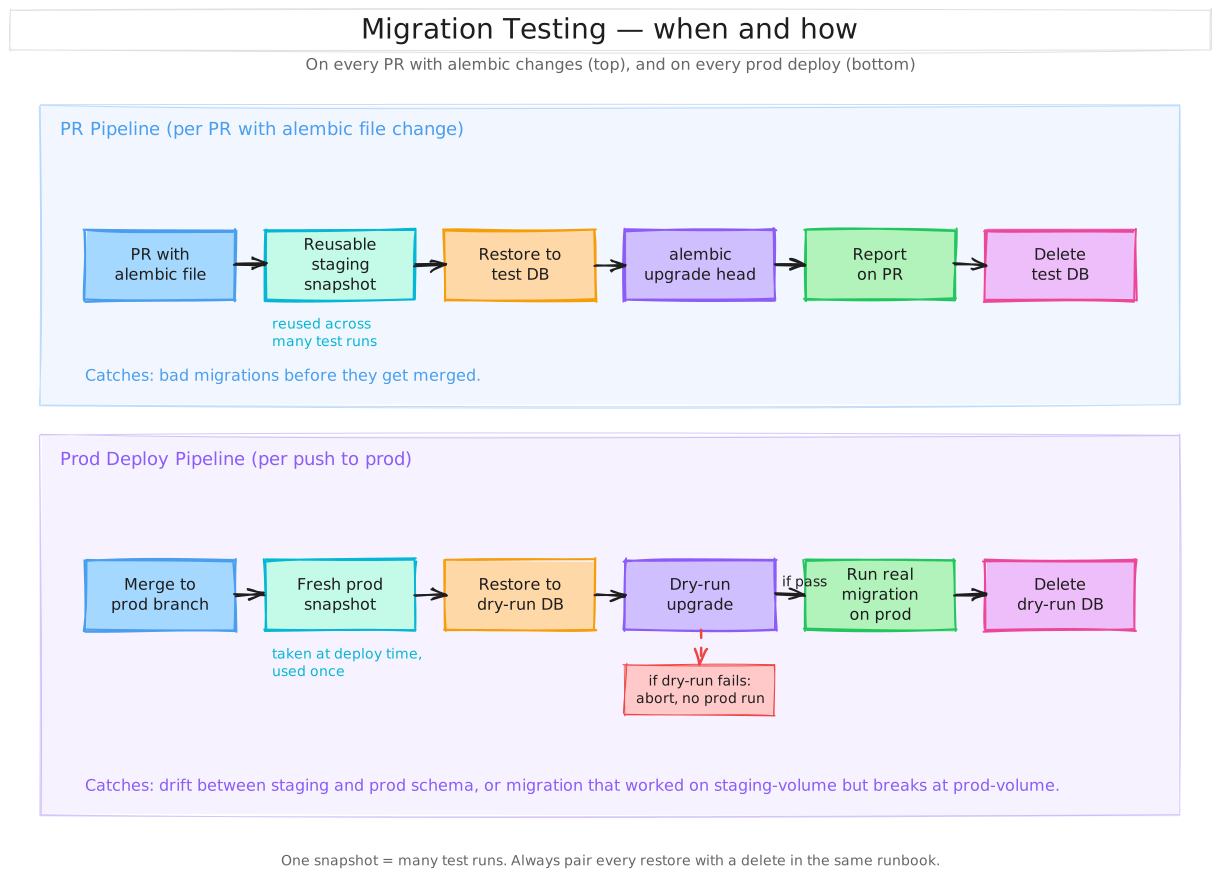 Migration testing flow — PR pipeline (top) and prod-deploy pipeline (bottom)
- Local Postgres (docker-compose) — catches obvious bugs.
- Staging with prod-like data volume — catches migrations that pass on 100 rows and fail on 100M. Use anonymized snapshots if you have to.
- Production — run during low-traffic window if you can; have an abort plan; watch lock waits and slow queries during the run.
"But running the migration changes the DB — how do I test it again?"
The big problem with migration testing: each run mutates the DB. To test the same migration twice you need to either undo it or start from a clean state. Three patterns, in order from where you are now:
1. Local: nuke the volume.
cd app4/fastapi-app
docker compose down -v   # the -v wipes the postgres volume
docker compose up -d     # fresh DB; entrypoint runs migrations from scratch
Cheapest reset; ~10 seconds. This is the right default while developing locally. Test, break, reset, test again.
2. Staging on RDS: snapshot + restore (one-snapshot, many-instances).
The model: a snapshot is reusable. You restore from it as many times as you want; each restore is an independent fresh DB.
1. Take ONE snapshot of staging (or a sanitized prod snapshot)
   → sits cheap in S3, doesn't go anywhere

2. Restore that snapshot to a NEW disposable RDS instance
   → e.g. "migration-test-001"

3. Run `alembic upgrade head` against it
   → see what happens, log everything

4. Delete the disposable instance
   → no further cost

5. Snapshot is STILL there → repeat steps 2-4 as many times as needed
# create the snapshot (one-time)
aws rds create-db-snapshot \
  --db-instance-identifier staging \
  --db-snapshot-identifier pre-migration-test

# restore to a new instance for each test
aws rds restore-db-instance-from-db-snapshot \
  --db-snapshot-identifier pre-migration-test \
  --db-instance-identifier migration-test-001

# ... run migration, observe ...

# delete when done
aws rds delete-db-instance \
  --db-instance-identifier migration-test-001 \
  --skip-final-snapshot
Snapshots cost ~$0.095/GB/month — very cheap. Restored instances bill hourly at the normal RDS rate; for a 15-minute test run it's pennies.
The trap: people forget to delete the restored instance. RDS keeps billing it hourly forever. Always pair every restore with a delete in the same runbook, or set a CloudWatch alarm on idle test instances.
3. The modern shortcut: cloneable / branchable DBs.
When migration testing becomes a daily activity, the snapshot/restore roundtrip (minutes per cycle) becomes a bottleneck. Two paths from there:
- Aurora DB Clones — copy-on-write clone of a running DB, near-instant. Same cost model as a normal Aurora instance.
- Neon / Xata / similar — Git-style branching for Postgres outside AWS. "Branch" the DB, run the migration, drop the branch. Test the same migration ten times in a few minutes total.
For learning / small teams: the snapshot+restore pattern is plenty. Reach for clones once you're testing migrations several times a day.
Why not alembic downgrade?
You'll see alembic downgrade -1 in tutorials. In theory it's how you
"undo" a migration; in practice:
- Autogenerated downgrades are often wrong — alembic infers the reverse from the diff and can miss edge cases.
- Many operations are lossy. Drop column? Data is gone. Downgrade recreates the column but not the rows that lived in it.
- Most teams don't write downgrades at all. Forward-only is the norm — if you need to "undo," write a new migration that reverses what the previous one did. Easier to reason about.
Use alembic downgrade for trivial reversals while iterating in dev.
For real testing, fresh DB > downgrade.
Migration review
"Always review auto-generated migrations before running them" — autogenerate misses table renames (sees drop+create, which is data-loss), data migrations, and some constraint changes.
The alembic revision --autogenerate output is a draft, not the
final. Review every line. If autogenerate produced a drop_column
followed by add_column, that's almost never what you want — it's a
rename and the data is gone.
Alembic-specific tips
- One change per migration. Easier to review, easier to rollback, easier to bisect when something breaks.
- Name them with intent.
2026_04_27_add_email_verified.pynot9f8e7d6c_revision.py. Use--rev-idor filename templates. - Branch labels for splitting environments — rarely needed, but exists if your dev/staging/prod schemas have to diverge briefly.
op.execute()for raw SQL when alembic's helpers don't cover what you need (e.g.CONCURRENTLY, partial indexes, partitioning).- Test the downgrade even if you don't plan to use it — if you can't write a downgrade, the migration probably isn't reversible, which is worth knowing.
- Run from CI, not from your laptop. Make the deploy pipeline the only thing with prod DB credentials.
When schema changes are too big: AWS Blue/Green
Sometimes you can't expand/contract — the change is too big (major version upgrade, dramatic restructure) or your app can't handle dual schemas. AWS supports Blue/Green deployments for exactly this — and contrary to what I'd thought, it works on both RDS and Aurora:
| Supported | |
|---|---|
| RDS for MySQL, MariaDB, Postgres | ✓ |
| Aurora MySQL, Postgres, Global Database | ✓ |
How it works:
- AWS clones your prod ("blue") into a synchronized staging ("green") that streams replication from blue.
- You apply the disruptive migration on green only. Blue keeps serving prod.
- Test green thoroughly.
- Switchover. AWS swaps the endpoints; blue becomes the standby and is retained for fallback.
Switchover times depend on engine:
- RDS Blue/Green: typically <5 seconds (or ~2s with the AWS Advanced JDBC Driver, since DNS propagation is bypassed).
- Aurora Blue/Green: typically under a minute.
The crucial limitation for schema migrations: replication blue → green is logical, so changes that break replication compatibility break the green deployment. Concretely:
- ✓ Adding new columns at the end of a table — replication still works.
- ✗ Renaming columns or tables — breaks replication. You can't use Blue/Green for renames.
- ✗ Type changes that aren't replication-compatible — see PG logical replication restrictions.
So Blue/Green is the right tool for: major version upgrades (PG14 → PG18), big index reorgs, additive structural changes you want to test against a copy first. Renames still need expand/contract — Blue/Green doesn't let you skip the dance.
Pre-deploy migration checklist
Before clicking "deploy" on anything that touches the DB:
- Is this migration in the 🟢/🟡/🔴 column? If 🔴, where's the expand/contract plan?
- Does the new schema work with both the current and the new app code? (Backward compatibility.)
- Are all
CREATE INDEXlines usingCONCURRENTLY? - Are all
ADD CONSTRAINTlines usingNOT VALID+ separateVALIDATE? - Is
lock_timeoutset? - Have I run this against staging/prod-like data volume?
- Does autogenerate look sane, or did it produce a drop+add that's actually a rename?
- Is there a forward-only undo migration ready in case I need to revert?
- Have I taken a snapshot for non-trivial / irreversible changes?
- Will replica lag bother any reader during the migration window?
- Will the migration run as a separate task before app rollout, or on app startup? If startup with N tasks, am I OK with that race?
If any answer is "I don't know" — pause and find out.
References
- pgroll — zero-downtime Postgres schema migrations — the modern automated expand/contract tool
- Zero-Downtime Alembic Migrations on PostgreSQL (Gold Lapel) — alembic-specific patterns
- Avoiding deadlocks in Postgres migrations (pganalyze)
- Schema changes and the Postgres lock queue (Xata)
- Zero-downtime Postgres schema migrations need this: lock_timeout and retries (PostgresAI)
- Running a safe database migration using Postgres (Retool)
- Which ALTER TABLE Operations Lock Your PostgreSQL Table?
- AWS RDS Blue/Green Deployments — schema modifications
- strong_migrations gem — Rails-side, but the README's list of unsafe migrations is gold for any Postgres user
- pgfence — migration safety CLI — lock mode analysis + risk scoring